
AI in UX research: where it helps, where it harms, and how to use it responsibly
.jpeg)

UX Researchers are increasingly asking the same question: can AI actually improve the quality of my research, or does it just make it faster? The answer is both, but only when applied with methodological discipline. This article maps exactly where AI fits into the UX research process, from planning and recruitment through to analysis and synthesis, which user research methods benefit most, which UX research tools are worth adopting, and where handing over control to a machine quietly compromises the rigour your insights depend on.
After years of conducting research with users, one truth remains constant regardless of technology: the quality of an insight depends on the quality of the question that precedes it. This article is not a tools guide; it is a reflection on how to integrate Artificial Intelligence (AI) into UX Research processes without compromising the epistemological and methodological rigour the discipline demands.
The real problem is not AI, but unrealistic expectations
There is a seductive narrative circulating in product teams: AI democratises UX Research, making it faster, more scalable, and accessible to those without specialist training. Part of that is true. The other part is an oversimplification that can seriously undermine the quality of the work and, consequently, the product decisions that depend on it.
AI is extraordinarily capable of processing, synthesising, and generating text. It is structurally incapable of being present: of reading the silence of a participant before they answer, of recognising that a “positive” response carries ambivalence in the tone of voice, of noticing that the physical context in which a session takes place completely changes the meaning of the data collected.
The UX Researcher who effectively integrates AI is not the one who uses the most tools. It is the one who knows exactly where to delegate and where to maintain full control. Delegating analysis to AI without critical review is the methodological equivalent of publishing results without reviewing the raw data. Speed never justifies epistemological negligence.
Where AI fits in the UX Research workflow
1. Planning and framing research questions
From the business question to the research question
Planning is where we are most likely to misuse AI during a research project: asking for a “research plan” without contextualising the problem will result in generic output and may create a false sense of rigour.
AI is useful here for accelerating desk research (synthesising existing literature, mapping competitive benchmarks, identifying gaps in prior studies), but for framing the research question, the researcher retains full control.
For example, instead of a shallow prompt like “create a research plan”, try: “given this business problem X and these hypotheses Y, which research questions are most relevant for invalidating or confirming our assumptions? Also identify those that fall outside the scope of this investigation.”
Where to maintain human control:
- Definition of the primary research question
- Prioritisation of hypotheses to be tested
- Decisions on methods appropriate to the organisational context
- Research timeline and scheduling
2. Recruitment, screeners and selection bias
Screeners, profiles, and selection biases
AI significantly accelerates the creation of screeners and recruitment communications. More relevant for experienced researchers: it can be used to identify potential selection biases before moving forward.
Ask AI to critique your screener in light of known biases (convenience bias, self-selection bias, WEIRD populations). The output is rarely perfect, but it functions as a useful sounding board for thinking out loud.
Another option is to use AI to generate participant profiles beyond those you have already defined, applying different criteria and perspectives, always questioning the reasoning behind its choices. This forces you to examine whether any exclusion is methodologically justified, or whether you have overlooked a sample segment that could yield valuable insights.
3. Data collection: what transcripts miss
Sessions, presence, and what transcription does not capture
Automated transcription tools (Otter.ai, Grain, Dovetail, and even Teams and Zoom) have freed up hours of administrative work. But they have created a new problem: some researchers conflate the transcript with the data. A transcript captures what was said, not the hesitation before a response, the smile that contradicts the words, or the micro-expression of frustration when navigating a prototype.
It is essential to maintain a separate record of non-verbal observations during the session, even if it amounts to just three lines per participant. This data does not exist in the transcript and is frequently the most revealing.
At this stage, AI can help you organise transcripts and participant responses so they are easier to visualise and analyse in subsequent phases. Use AI as your personal research assistant and delegate the repetitive, low-value tasks to it.
4. Qualitative analysis and the risk of premature convergence
Thematic analysis and the risk of premature convergence
This is the phase with the greatest potential and the greatest risk. AI can process dozens of transcripts and propose thematic groupings in seconds. But the problem is structural: language models are trained to find patterns and generate narrative coherence. This means they will always produce clusters, even when the data is ambiguous, contradictory, or insufficient to support solid conclusions.
Use AI for a first thematic pass, then conduct your own independent second analysis on the raw data and compare the findings. Divergences are often the most interesting points, where your field experience captures something the model cannot identify.
Do not accept AI-generated clusters without interrogating them, and avoid closing the analysis prematurely. Building insights is an interpretive act that demands multiple iterations. AI produces rapid descriptive analysis; it rarely produces deep interpretive analysis.
A practical tip for those beginning to use AI in their analyses, or who feel apprehensive about doing so at such a critical stage: submit your own insights to the AI and ask for its perspective or alternative viewpoints. This gives you a second opinion on your material and can help enrich it further.
5. Synthesis: turning data into decisions
From data to decisions: the final step is always human
Synthesis is where the researcher transforms observations into actionable insights. AI is an excellent partner for structuring and communicating what has already been interpreted, including drafting reports, adapting language for different audiences (product, business, C-suite), and generating initial versions of personas or journey maps based on the identified themes.
Use AI freely to create reports and streamline the presentation of material you have already analysed. Remember:: read everything AI produces with a critical eye. Put yourself in the position of your audience and assess whether the narrative holds together and whether the storytelling makes sense.
Where AI adds value and where in creates risk
Where AI adds genuine value
- Eliminates hours of low-cognitive-value administrative work
- Desk research and synthesis of existing literature
- Transcription and initial synthesis of interviews at scale
- First drafts of artefacts (guides, screeners, discussion guides, reports)
- Sounding board for identifying blind spots
- Translation of insights for multiple organisational audiences
- Identification of potential methodological biases
Where the risks are systemic
- Premature convergence in qualitative analysis
- Hallucinations: AI fabricates plausible but false citations and patterns
- Loss of cultural, emotional, and contextual nuance
- Model biases reflected in outputs without flagging
- False sense of rigour in superficial analyses
- Privacy and GDPR: participant data processed by external platforms
- Implicit delegation of interpretive judgement to the machine
When to use each approach
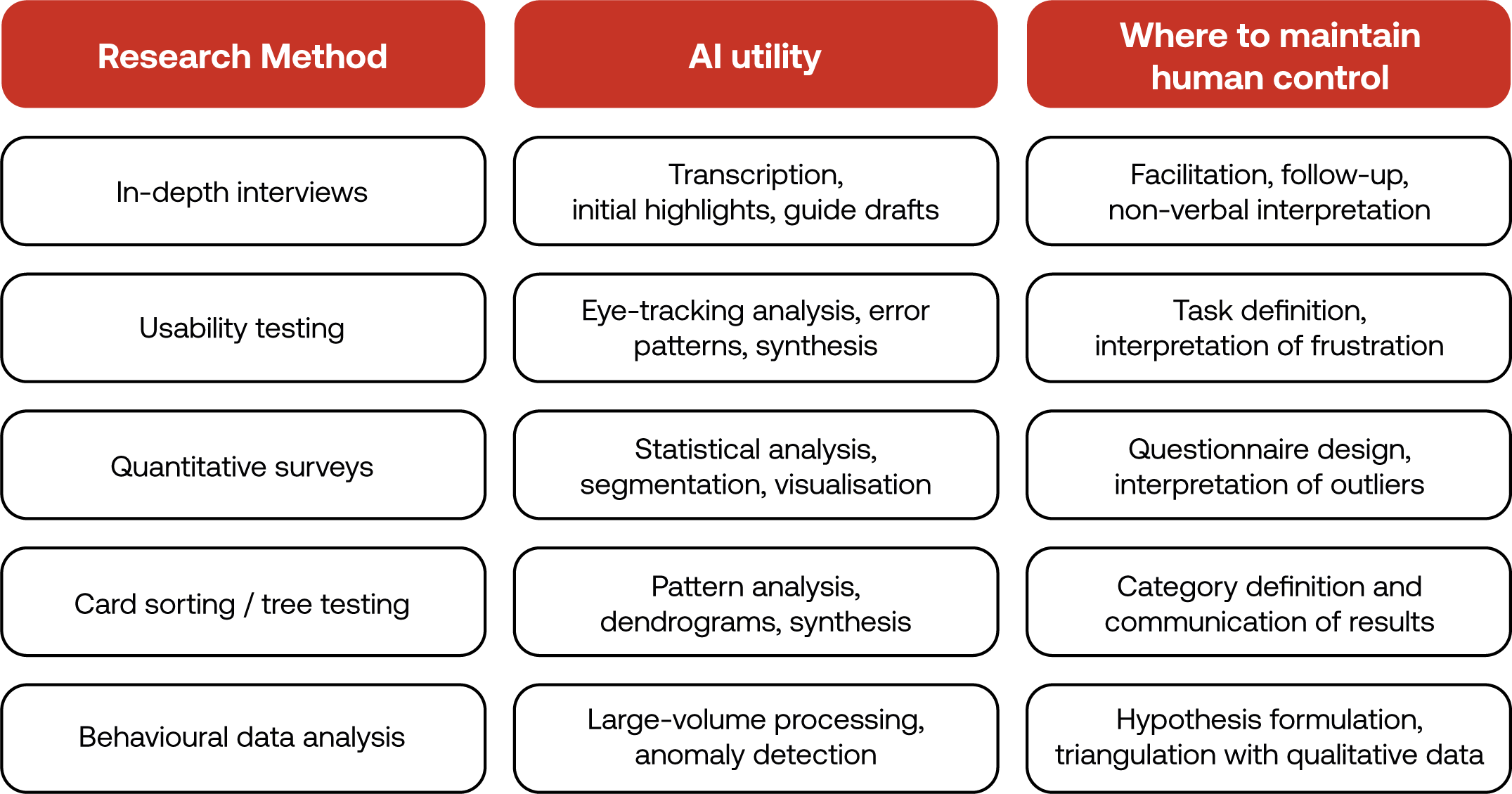
What no tool resolves for you
The uncritical adoption of AI in UX Research raises ethical questions that go beyond data privacy. When a model automatically synthesises “what users said”, who is accountable for the interpretation? When an AI-generated report is presented as “research insights”, what part of the epistemological and methodological chain has been lost?
Consent and privacy and GDPR considerations
Participants consent to being recorded for internal analysis, but rarely to having their data processed by external AI platforms. Review your consent protocols to include the tools you use. A transcript uploaded to Dovetail, Grain, or any external Large Language Model (LLM) may violate the original consent, depending on how it was drafted. In a European context, the GDPR is non-negotiable, and “I was in a hurry” is not a legal justification.
Representativeness and systemic bias
AI models carry biases inherent to their training data. When used for qualitative analysis, these biases can systematically under-represent minority or culturally distant perspectives. A model trained predominantly on English-language, Western contexts will interpret responses from Portuguese, Brazilian, or African users through a lens that is not neutral. The researcher must serve as that filter.
Epistemic accountability in AI-assisted research
Whoever signs a research report is accountable for methodological rigour, regardless of how many tools were used. “AI analysed the data” is not a valid methodological justification, just as “SPSS ran the regression” never replaced the need to understand what the numbers mean. The tool executes; the researcher is responsible.
Pressure and organisational context
Deadline pressure is a reality shared across the entire team, and AI can genuinely help respond to that pressure at many stages of the process. What is worth communicating to stakeholders is that there are phases where accelerating carries a direct cost to insight quality. Making that trade-off visible and explicit is as important as the analysis work itself, and it is a way of a way of educating the organisation about the value of rigorous research.
Final tip
Whenever you begin a new research project, create a context document with the essential information: business problem, hypotheses, participant profiles, and research objectives. Paste this context at the start of each new conversation with your preferred AI tool (in my case, Claude). Even when starting a fresh conversation, the model will have the foundation it needs to provide contextualised and relevant responses. Very long conversations tend to lose coherence as context accumulates; a well-structured context document resolves this issue and also forces you to clarify your own thinking before you begin.
FAQ: AI in UX Research
Can AI replace a UX Researcher?
No. AI cannot replace a UX Researcher. It can automate transcription, accelerate thematic analysis, and draft reports, but it is structurally incapable of facilitating a session, reading non-verbal cues, or making interpretive judgements grounded in context. The researcher's role shifts towards higher-order thinking: framing the right research questions, critically validating AI outputs, and translating findings into decisions that reflect real human complexity.
Which UX research methods benefit most from AI tools?
Quantitative methods and large-scale data analysis benefit most from AI, followed by transcription-heavy qualitative methods. Card sorting, tree testing, behavioural analytics, and survey analysis all gain significantly from AI-assisted pattern recognition. In-depth interviews and ethnographic research benefit more selectively: AI helps with transcription and initial synthesis, but the facilitation and interpretation remain entirely human responsibilities.
What are the biggest risks of using AI in UX Research?
The three most critical risks are premature convergence in qualitative analysis, hallucinations in synthesised outputs, and GDPR violations when participant data is processed by external AI platforms. AI models are trained to find patterns and generate coherent narratives, which means they will produce clusters and summaries even when the underlying data does not justify them. Researchers must treat AI output as a first draft, not a conclusion.
How should a UX Researcher use AI during data analysis without compromising rigour?
Use AI for a first thematic pass, then conduct an independent second analysis on the raw data yourself. Compare both outputs and pay close attention to divergences: those gaps are where your field experience captures nuance the model cannot. Never accept AI-generated clusters as final. Thematic analysis is an interpretive act that requires multiple iterations and direct engagement with the data.
What is the best way to use AI at the start of a UX research project?
Create a context document before opening any AI tool. Include the business problem, key hypotheses, participant profiles, and research objectives. Paste this at the start of every AI conversation related to the project. This keeps responses contextualised, prevents generic output, and forces you to clarify your own thinking before the research begins. Use AI to stress-test your research questions and identify potential biases in your screener, not to generate the research plan from scratch.






.jpeg)