
Prompt engineering for UX: controlling generative AI


The "Mental Model" Shift (The "What")
Nowadays, everyone knows what a prompt is, especially if your work is related to the IT field. Day by day, the number of tech companies requiring their employees to use AI daily is increasing, and this is a reality in the UX/UI field too. So, to become better designers and successfully ride this "AI wave," we should deeply understand how to build a good prompt and how to carefully use AI tools on a daily basis.
To make this even clearer to my fellow designers, you should think of a prompt as a Design Brief. For example, if someone gives you a general and basic brief like, "Make a website," you could build many different types of websites. This might be interpreted by your client as if you are a bad designer because you didn't understand what they wanted. But, instead of that general brief, if they give you a concise one, for example: "Make a high-conversion landing page for 40-year-old SaaS buyers with a dark mode theme," you will be able to build something way better and according to the client's expectations, and they will probably classify you as a good designer.
So, be precise when you are building a prompt for an AI tool. It cannot "read" your mind and understand what you want if you don't give it the right indications.
The "Anatomy of a Perfect Prompt" (The "How")
So, how can we create a good prompt? Is there any guideline to create a good prompt?
Yes, there are several frameworks to create good prompts, but depending on the type of goal you want to achieve or the type of result you want to get, there are different frameworks that we could use. The more complex your design challenge, the richer your prompt needs to be. The image below maps four frameworks to match every level.
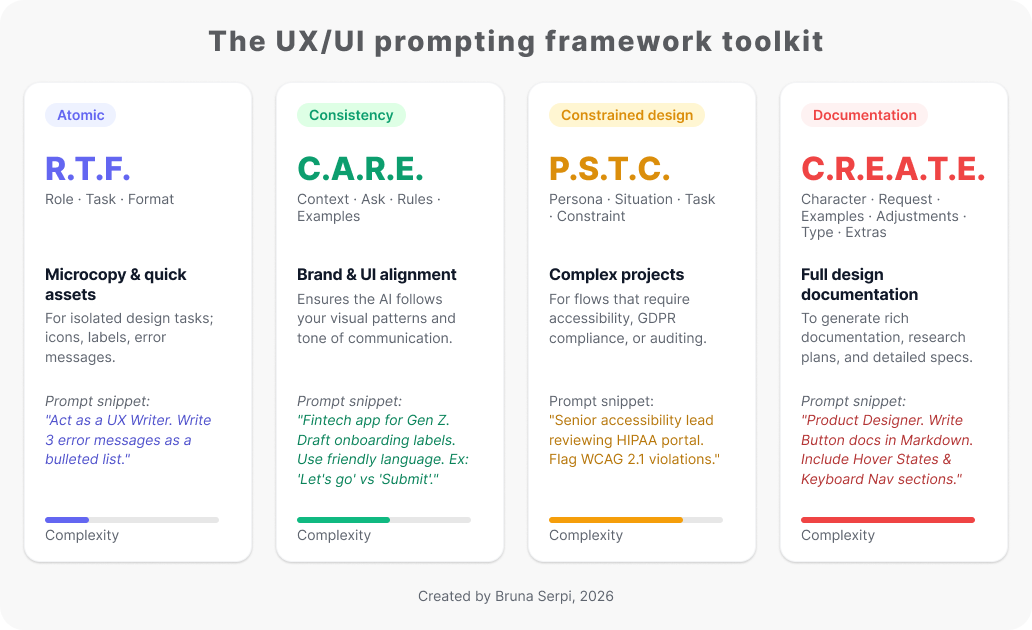
But remember, prompting is iterative, the perfect prompt will not appear the first time. You will need to define your goal, create an initial prompt, test the prompt, analyze the response, refine the prompt, and iterate the process. You will probably need to go through this cycle more than once to get the "perfect response," so don’t give up on your first try or in the first few minutes.
Where to Find Inspiration: Prompt Libraries for Designers
When it comes to finding ready-to-use prompts, there are already several platforms acting as prompt libraries. Here are a few examples worth exploring:
- AI UX Playground: A library highly focused on UX/UI workflows.
- Snack Prompt: A community-driven platform covering a wide range of topics.
- PromptHero: Excellent for generative images and visual inspiration.
- UX Pilot: A Figma plugin that provides handy prompt suggestions directly inside your design canvas as you chat with AI.
For those who prefer learning from books rather than scanning websites, "uxGPT: Mastering AI Assistants for User Experience Designers and Product Management Professionals" by Patrick Neeman is a fantastic, highly practical resource that serves as an excellent offline prompt library.
However, we need to keep in mind that this ecosystem is still in its early stages; new AI tools and prompt libraries are popping up every single day. Most of the platforms I have explored so far are either not tailored specifically to the granular UX/UI tasks we face in real-world projects, or they are locked behind a paywall. Over time, I am confident we will see a surge in free, specialized prompt libraries dedicated purely to product design.
Why Should Designers Care? (The "Why")
There is a classic phrase circulating in the tech world: AI won’t replace designers, but designers who use AI will replace those who don’t. Instead of viewing generative AI as a threat, we need to reframe prompt engineering as a career superpower that brings efficiency, bridges the gap to engineering logic, and helps us scale design in complex environments like B2B SaaS.
The anxiety around AI usually stems from a misunderstanding of our value. AI is already great at routine production work like wireframe generation, layout variations, draft copy, transcript summaries, and basic heuristic checks. When a task is mostly execution and the brief is clear, the mechanical part of design shrinks.
However, this is exactly where your strongest protection lies. The future of our field requires moving from “making screens” to “shaping decisions.” While AI handles execution, designers must double down on high-level skills that require human judgment, check the image below:
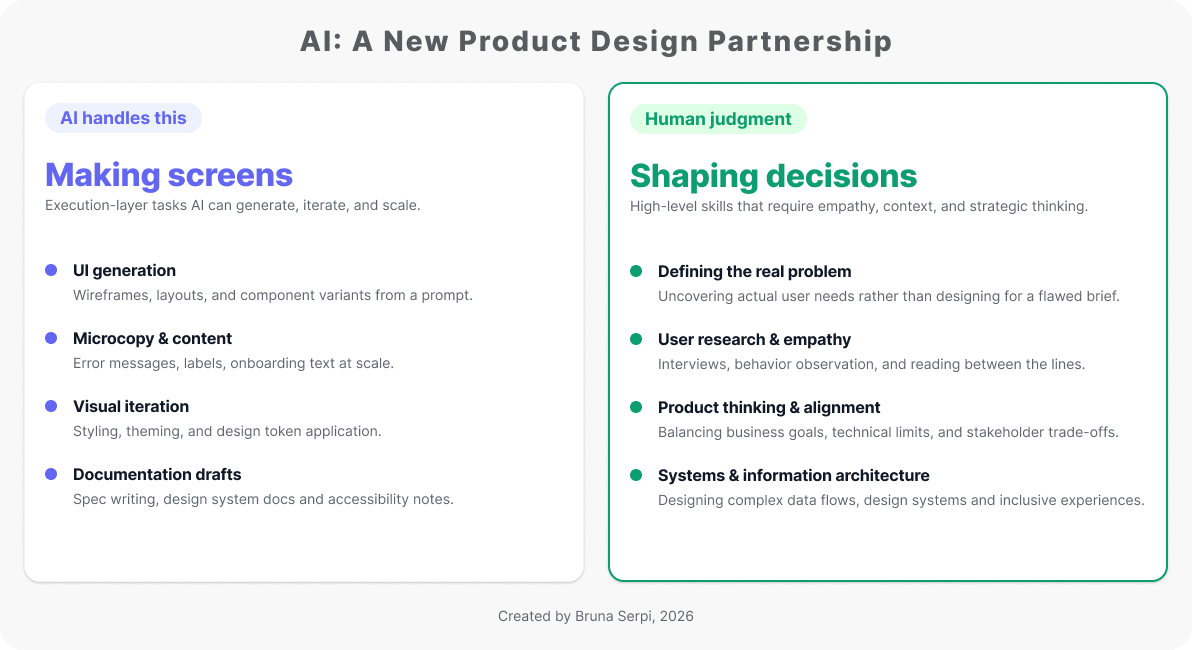
When designers spend less time on repetitive execution, we gain the time to focus on high-impact product decisions that actually drive business growth and probably will result in a higher return on investment. Mastering prompt engineering helps designers generate foundational drafts that, for example, respect the project’s design system, ensuring full scalability without losing consistency.
A simple rule to remember: If a task can be described fully in a prompt and checked mechanically, AI will probably do it soon. If it depends on human judgment, trust, or organizational politics, that is still designer territory.
Final Notes and Crucial Tips
Mastering Prompt Engineering for UX takes time, and as you begin integrating it into your daily workflow, keep these final three rules in mind to protect your design quality and your product's compliance.
1. Prompting is Prototyping (Iteration is Key)
Don't give up on the first generic result. Prompting is an iterative process, just like wireframing, you must test, analyze, and tweak your instructions 5 to 10 times to get the perfect response.
2. Activate Your Critical Eye (Bias & Hallucinations)
AI is a prediction engine, not a fact engine, and often defaults to outdated solutions. For example, it won’t know your Business-to-Business platform needs Single Sign-On or Multi-Factor Authentication for compliance unless you explicitly guide it.
3. Pro-Tip: Privacy First
Never paste sensitive client data, roadmaps, or Personally Identifiable Information into public AI tools. Always anonymize your data first to protect user privacy and maintain professional compliance.
Wrapping Up
Embracing AI doesn't mean changing who you are as a designer; it means upgrading your toolkit.
And, if you are wondering if I used the help of AI tools to write this article, the answer is: of course I did! It was an amazing partner to help me structure all the research I gathered and organize each paragraph to make this a much cleaner, easier read for you. Practice what you preach, right?
I hope this guide helps you take control of generative AI and make it your ultimate design partner.
Cheers!
FAQ
1. Why should prompt engineering be considered a core skill for UX designers?
Mastering prompt engineering for UX allows designers to automate repetitive tasks, saving time and helping them stay competitive as more tech companies require AI skills every day.
2. Will AI replace designers, and what are the business benefits of using it?
No, AI won't replace designers because it lacks human judgment, empathy, and the ability to make strategic product decisions. Instead, by letting AI handle repetitive tasks, designers gain time to focus on business growth and strategy, likely leading to faster product launches and a much higher return on investment for companies.
3. How can prompts help with specific tasks like design systems and UX writing?
Precise prompts allow you to generate microcopy variations that match your brand tone, while ensuring that layout drafts respect your project's design system rules and keep everything consistent.
4. What is the best way for a designer to start working with AI?
Treat your prompts like design prototypes (test, iterate, and refine them). You can also use specialized prompt libraries to learn the best ways to guide the AI for great results.
-
References
Neeman, P. 2024. uxGPT: Mastering AI Assistants for User Experience Designers and Product Management Professionals. Available at: https://www.amazon.com/uxGPT-Assistants-Experience-Management-Professionals/dp/B0DNXB53F9 (Accessed: 14 January 2026).
Nielsen Norman Group. 2024. ‘CARE: A Structure for Crafting AI Prompts’. Available at: https://www.nngroup.com/articles/careful-prompts/ (Accessed: 22 March 2026).
Interaction Design Foundation. 2024. ‘How to Craft Effective Text Prompts for Design’. Available at: https://ixdf.org/literature/article/how-to-craft-effective-text-prompts-for-design (Accessed: 5 February 2026).
Interaction Design Foundation. 2024. ‘Introduction to Prompt Engineering & Types of AI Prompts’. Available at: https://ixdf.org/literature/topics/prompt-engineering (Accessed: 12 April 2026).
Interaction Design Foundation. 2024. ‘Types of AI Prompts’. Available at: https://ixdf.org/literature/topics/ai-prompts#types_of_ai_prompts-4 (Accessed: 12 April 2026).
Neale, K. 2024. ‘Prompt Engineering is the New UX Skill’. Medium. Available at: https://medium.com/@katyneale/prompt-engineering-is-the-new-ux-skill-b3a58cb00e14 (Accessed: 3 April 2026).
Bernecker, C. 2023. ‘Prompt Design Pattern Part 1: Role-Task-Format Prompt (RTF)’. Medium. Available at: https://christianbernecker.medium.com/prompt-design-pattern-part-1-role-task-format-prompt-rtf-44297b8bd38e (Accessed: 11 January 2026).
AI Quick Tips. 2023. ‘Prompt Framework C-R-E-A-T-E’. Medium. Available at: https://medium.com/ai-quick-tips/prompt-framework-c-r-e-a-t-e-6dca72c9763f (Accessed: 28 April 2026).
Nielsen Norman Group. 2025. ‘CARE: Structure for Crafting AI Prompts’. Available at: https://www.youtube.com/watch?v=aeJ5fNFexhc (Accessed: 18 February 2026).
Smart, P. 2024. ‘Generative Interfaces: The Future of Digital Products with AI — MIT EmTech Digital’. AI x Design Leadership. Available at: https://www.youtube.com/watch?v=A5rniBTm2uo (Accessed: 29 March 2026).
Smart, P. 2024. ‘The Future of Design with AI’. awwwards. Available at: https://www.youtube.com/watch?v=gLSdQaDbnrM (Accessed: 11 January 2026).
Beauchene, V. 2026. ‘Will AI Take Your Job in the Next 10 Years? Wrong Question’. TED. Available at: https://www.youtube.com/watch?v=lX2V8p-hByE (Accessed: 14 April 2026).





.jpeg)